
-
Calculation Group Gotchas
January 24, 2021 / No Comments »

The moment you add a calculation group to your model, Power BI sets DiscourageImplicitMeasures = True on the model. Although this property can trick you to be believe that they are still supported, you can't create implicit measures, such as by dragging a numeric field on the report to summarize that field. That's because implicit measures are created as inline calculations which calculation groups don't support. Also, there is a current issue where when you add a column from a calculation group to a filter, "Require single selection" is set to on and it can't be changed. Therefore, you won't be able to filter multiple calculation items, such as to present t only MTD, QTD, and YTD from a list of many items in your calculation group. As a workaround, you add a calculated column that flags the desired values and filter on it. You can vote to expedite the...
-
Rogue Q&A Queries
January 24, 2021 / No Comments »
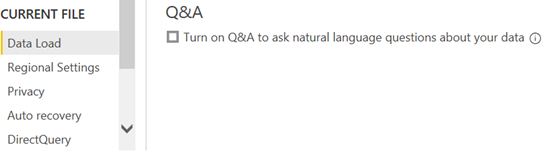
I've noticed severe performance degradation after refreshing a Power BI Desktop model with some five million rows. The Power BI Desktop process showed a sustained 50-60 % utilization for minutes in the Windows Task Manager. I did a profiler trace and I saw expensive DAX queries like these: EVALUATE SELECTCOLUMNS(FILTER(VALUES('Sales'[PONumber]),LEN('Sales'[PONumber])<=100),"valueColumn",'Sales'[PONumber]) EVALUATE SELECTCOLUMNS(FILTER(VALUES('Sales'[SalesOrderNumber]),LEN('Sales'[SalesOrderNumber])<=100),"valueColumn",'Sales'[SalesOrderNumber]) EVALUATE SELECTCOLUMNS(FILTER(VALUES('Sales'[InvoiceNumber]),LEN('Sales'[InvoiceNumber])<=100),"valueColumn",'Sales'[InvoiceNumber]) As it turned out, Power BI Desktop autogenerates these queries when building a Q&A index. The 100-size limit is because Power BI wants to keep the index small. In addition, values that are longer than 100 characters are unlikely to be asked by the user. Why not check thd the maximum column value and skip the column? Power BI wants to skip instances that are too long but still index the remaining instances of the column. To avoid this performance degradation when modeling on the desktop you could disable the Q&A feature. This will also disable...
-
Applied Power BI Book (6th Edition)
January 2, 2021 / No Comments »
Happy New Year! I'm excited to announce the availability of the sixth edition of my Applied Microsoft Power BI book! When the first edition was published in January 2016, it was the first Power BI book at that time and it had less than 300 pages. Since then, I helped many companies adopt or transition to Power BI and taught hundreds of students. It's been a great experience to witness the momentum surrounding Power BI and how the tool has matured over time. As a result, the book also got thicker and it almost doubled in size. However, I believe what's more important is that this book provides systematic, yet dependent, view by showing what Power BI can do for four types of users (business users, analysts, pros, and developers). To my understanding, this is the only Power BI book that gets annual revisions to keep it up to date...
-
Atlanta MS BI and Power BI Group Meeting on January 4th
December 31, 2020 / No Comments »

Please join us online for the next Atlanta MS BI and Power BI Group meeting on Monday, January 4th, at 6:30 PM. James Serra (Big Data/Data Warehouse Evangelist at Microsoft) will share best practices around staging data in an organizational data lake. For more details, visit our group page and don't forget to RSVP (fill in the RSVP survey if you're planning to attend). Presentation: Data Lake Overview Date: January 4th, 2020 Time 6:30 – 8:30 PM ET Place: Click here to join the meeting Learn More | Meeting options Overview: The data lake has become extremely popular, but there is still confusion on how it should be used. In this presentation I will cover common big data architectures that use the data lake, the characteristics and benefits of a data lake, and how it works in conjunction with a relational data warehouse. Then I’ll go into details on using Azure Data...
-
Microsoft Dataverse: A Verse Without Rhymes
December 30, 2020 / No Comments »

The cloud is supposed to make things easier, right? Well, not necessarily, as a client and I have recently discovered. They use Dynamics Online 365 and they are facing long refresh times for Power BI datasets that import data from Dynamics. Dynamics saves its data in an Azure SQL Database, which now goes by the name Dataverse (previously known as Common Data Service for Apps or CDS-A). I wrote two years ago about the pros and cons of CDS-A. The ugly award back then went to getting the data out of Dynamics. I wrote "For years people were complaining that after migrating from the on-premises Dynamics to the cloud, they lost the ability to connect to its database directly and they had to rely on the REST APIs (slow) or Data Export Service to export the data to an SQL Server Database (fast but requires additional effort and budget)." Have...
-
The Science of Counting
December 4, 2020 / No Comments »

I'm watching the witness testimonies for election irregularities in Georgia (the state where I live). I'm shocked about how this election became such a mess and international embarrassment. United States spent 10 billion on the 2020 election. Georgia alone spent more than 100 million on some machines the security experts said can be hacked in minutes. If we add the countless number of manhours, investigations, and litigations, these numbers will probably double by the time the dust settles down. What did we get back? Based on what I've heard, 50% of Americans believe this election is rigged, just like 50% believed so in 2016. The 2020 election added of course more options for abuse because of the large number of mail-in ballots. It's astonishing how manual and complicated the whole process is, not to mention that each state does things differently. But the more human involvement and moving parts, the...
-
Atlanta MS BI and Power BI Group Meeting on December 7th
December 3, 2020 / No Comments »
Please join us online for the next Atlanta MS BI and Power BI Group meeting on Monday, December 7th, at 6:30 PM. Patrick LeBlanc (A Guy in the Cube) will share techniques to optimize your Power BI data models. For more details, visit our group page and don't forget to RSVP (fill in the RSVP survey if you're planning to attend). Presentation: Optimizing the size of your model Date: December 7th, 2020 Time 6:30 – 8:30 PM ET Place: Click here to join the meeting Learn More | Meeting options Overview: When working with your Power BI Data Model/Dataset there are certain that can be done to optimize the size of the model. With that, there are certain thing that can be done that wreaks havoc on your Data Model. In this session we will walk you through several things that can be done to ensure that your data model is optimize...
-
Understanding Power BI Endpoints
November 29, 2020 / No Comments »
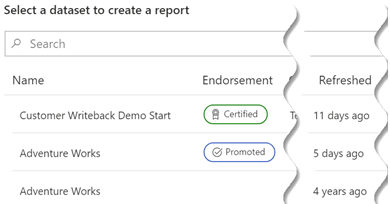
In its early days, Power BI introduced an endpoint to support Analyze in Excel (AIXL). Later, the "Power BI datasets" connector relied on this endpoint to support connecting to published datasets. The AIXL endpoint was never intended to support other clients. It has a few limitations, such as it doesn't support long running requests and write operations. Also, it doesn't support importing data as you've probably found when connecting to published datasets. Later, Power BI Premium added the XMLA endpoint to support external clients connected to datasets in a premium capacity. If you're on Premium, you should use the XMLA endpoint to connect external clients by using the Azure Analysis Services connector. Unfortunately, if you do so in PBI Desktop, "Get Data" won't give you the nice UX that shows you which datasets are certified. It will be nice if Microsoft adds a mechanism in the future where the client...
-
Updated Export Settings
November 26, 2020 / No Comments »

A Happy Thanksgiving to all of you! I'm thankful for your interest in and support of my work. I'm glad that Microsoft has recently updated the Power BI tenant export settings and thus mitigated the the complaints I had in my "A False Sense of Data Security" blog. Disabling the "Export to …" settings, which now applies also to paginated reports, no longer disables live connections to published datasets and features that depend on it, such as connecting to published datasets in Power BI Desktop, accessing the Power BI Premium XMLA endpoint, and Analyze in Excel. Instead, there is a clear distinction and now there two separate settings that affect external connectivity (for XMLA connectivity, the XMLA Endpoint capacity setting must be enabled in Read-Only or Read-Write modes): Allow live connections – This is a catch-all setting for allowing the live connectivity features. Allow XMLA endpoints and Analyze in Excel...
-
Power BI Dynamic M Query Parameters – Another Opportunity Missed for DirectQuery Users
October 21, 2020 / No Comments »

UPDATE 17-Feb-2022: Dynamic query parameters now support popular relational data sources, and I posted an updated blog. I had recently a Power BI advisory engagement for a large ISV. They had many customers. and each customer data was hosted in its own database for security reasons, with all databases having an identical schema. Power BI reports had to connect using DirectQuery to avoid refreshing data (real-time BI). Naturally, the customer envisioned a single set of reports with the ability to switch the dataset connection to the respective database depending on the user identity and company association. In addition, they wanted to piggyback on the existing database security policies by having each visual call a stored procedure and pass the user identity as a dynamic parameter. Can Power BI do this? Unfortunately, no. The main architectural issue is that although the model (VertiPaq) and query (Power Query) are bundled in Power...
Training
 We offer onsite and online Business Intelligence classes! Contact us about in-person training for groups of five or more students.
For more information or to register click here!
Books
 Learn Power BI at your own pace with our latest book Applied Microsoft Power BI. Targeting information workers, data analysts, pros, and developers, It is designed as an easy-to-follow guide for learning how to implement BI solutions spanning the entire personal-team-organizational BI spectrum.

