-
Power BI Pro Storage Quota
January 7, 2020 / No Comments »
Although Power BI has been evolving for almost five years now, basic concepts are sometimes worth revisiting. Recently, I had a discussion regarding the Power BI Pro storage quota on the Power BI MVP list and I want to share the conclusions confirmed by Microsoft. For workspaces in shared capacity licensed with Power BI Pro (not a workspace in a Premium capacity): There is a per-workspace storage limit of 10 GB. So, My Workspace gets 10 GB and so does any org workspace. There is also an unofficial cross-workspace aggregate quota of 10 GB * the number of Pro User Licenses intended as a backstop to prevent abuse so that a Pro user doesn't keep on indefinitely creating workspaces to get new chunks of 10 GB. So, if you have 50 Power BI Pro users, the aggregate cross-workspace storage quota would be 500 GB irrespective if only one or multiple...
-
Atlanta MS BI and Power BI Group Meeting on January 6th
January 3, 2020 / No Comments »
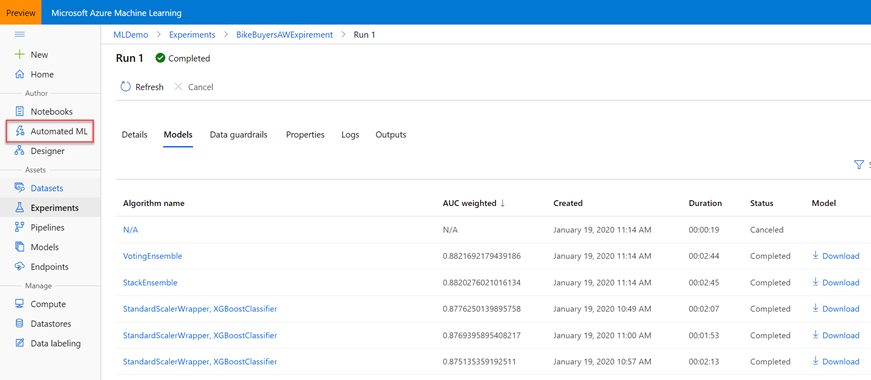
MS BI fans, join us for the next Atlanta MS BI and Power BI Group meeting on January 6th, Monday, at 6:30 PM at the Microsoft office in Alpharetta. I'll introduce to Power BI Premium Automated Machine Learning (AutoML). Prologika will sponsor the meeting. For more details, visit our group page and don't forget to RSVP (fill in the RSVP survey if you're planning to attend). Presentation: Power BI Automated Machine Learning (AutoML) Date: January 6th, 2020 Time 6:30 – 8:30 PM ET Place: Microsoft Office (Alpharetta) 8000 Avalon Boulevard Suite 900 Alpharetta, GA 30009 Overview: With the growing demand for predictive analytics, Automated Machine Learning (AutoML) aims to simplify this process and democratize Machine Learning so business users can create their own basic predictive models. Join this presentation to learn how to apply AutoML in Power BI Premium to predict the customer probability to purchase a product. I'll show you the end-to-end AutoML process, including: · ...
-
Applied Power BI Book (5th Edition)
January 2, 2020 / No Comments »
I'm excited to announce the fifth edition of my Applied Microsoft Power BI book! When the first edition was published in January 2016, it was the first Power BI book at that time and it had less than 300 pages. Since then, I helped many companies adopt or transition to Power BI and taught hundreds of students. It's been a great experience to witness the momentum surrounding Power BI and how the tool has matured over time. As a result, the book also got thicker and it now stands at 528 pages. However, I believe what's more important is that this book provides systematic, yet dependent, view by showing what Power BI can do for four types of users (business users, analysts, pros, and developers). To my understanding, this is the only Power BI book that gets annual revisions to keep it up to date with this ever changing technology! Because I had...
-
Power Platform World Tour
December 18, 2019 / No Comments »
Organized by Microsoft and Dynamic Communities, the Power Platform World Tour will take a place in Atlanta from 2/10-2/12, 2020. I'm teaching Power BI Dashboard in a Day (DIAD) on Feb 10 for a full day. Although this is a paid event ($599), you should get a great business value as the audience will probably be smaller and I'll be able to provide more personal attention. Then, I'll present "Bridge Analytics and Developer Worlds with Power Platform" on Feb 12 and show how Power BI can integrate with Power Apps to allow you to change the data behind a report.
-
Power BI Incremental Refresh
December 14, 2019 / No Comments »
Power BI incremental refresh (a Power BI Premium feature) refreshes a subset of a table with imported data. The main goal is to reduce the refresh time so that new data becomes available online faster. Patrick LeBlanc has a great video about how to make the incremental refresh even more incremental by using the "Detect data changes" feature and he explains in detail how it works. What if you want to fully refresh the dataset set up for incremental refresh? For example, you configure a table for incremental refresh periodically, but you want to fully process the dataset nightly, such as to pick the latest changes to dimensions. Currently, the only option to fully refresh the dataset with an incremental refresh policy is to republish the dataset and refresh it (this works because the first refresh is always full). When the XMLA endpoint becomes writeable, you'll have the option to...
-
BI Axioms
December 10, 2019 / No Comments »
A few months ago, I did an assessment for a large company that was advised by an undisclosed source that they should use their Dynamics Financials and Operations (F&O) system as a data warehouse. Recently, I came across a similar wish to use SAP as a data warehouse. I understand that people want to do more with less and shortcuts are tempting. But ERP systems can't fulfill this purpose, and neither can other systems of record. True, these systems might have analytical features, but these features typically deliver only operational reporting. Operational reporting has a narrow view concerned with "now", such as a report that shows customers with outstanding balances as of today. By contrast, BI is mostly concerned with historical and trend analysis. In math, axioms are statements that are assumed to be correct without a proof. We need BI axioms and the list can start like this: Every...
-
Tips for Extended Events
December 8, 2019 / No Comments »
Load testing and troubleshooting Analysis Services often requires capturing a query trace. The lightweight option to do so is to create an Extended Events (xEvents) session. Let's say you want to capture all query traffic for 24 hours. You might opt to use the SQL Server Profiler, but it's implemented as a desktop app (there must be an active Windows session but what happens if the Profiler crashes or corporate policy logs you out?) and it may impact the performance of your production server. The recommend way is to set up an xEvents session that logs the required events (same events you see in SQL Server Profiler) to a *.xel file. What's not so obvious is how to analyze the file. The easiest way is to open the .xel file in SQL Server Management Studio (SSMS). You'll see a new Extended Events menu added to the menu bar. Among other...
-
Atlanta MS BI and Power BI Group Meeting on December 2nd
November 28, 2019 / No Comments »
MS BI fans, join us for the next Atlanta MS BI and Power BI Group meeting on November 4, Monday, at 6:30 PM at the Microsoft office in Alpharetta. Stacey Jones will present Power BI options with Python. Accelebrate will sponsor the meeting. And I will share some tips demoing the latest Power BI Desktop features, such as the new ribbon, decomposition tree and AI integration. For more details, visit our group page and don't forget to RSVP (fill in the RSVP survey if you're planning to attend). Presentation: Integrating Power BI with Python Date: December 2nd, 2019 Time 6:30 – 8:30 PM ET Place: Microsoft Office (Alpharetta) 8000 Avalon Boulevard Suite 900 Alpharetta, GA 30009 Overview: Python is well suited for Data Science and big data professionals. It has been voted as the most popular programming language in 2019. Microsoft made big investments in open-source R and Python, especially to extend Power BI. Join...
-
Power BI Large Datasets: The Good, the Bad, and the Ugly
November 10, 2019 / No Comments »
At Ignite 2019 Microsoft announced the public preview of large datasets in Power BI Premium. This is a significant milestone as now datasets can grow up to the capacity's maximum memory (previously, the max size was 10 GB with P3 plan), thus opening the possibility of deploying organizational semantic models to Power BI. I consider this feature mostly suitable for organizational BI as I don't imagine business users dealing with such large data volumes. I tested large datasets during its private preview, and I'd like to share some notes. The Good Today, BI developers can deploy organizational semantic models to three Analysis Services Tabular SKUs: SQL Server Analysis Services, Azure Analysis Services, and now Power BI Premium. SQL Server Analysis Services is the Microsoft on-prem offering and it aligns with the SQL Server release schedule. Traditionally, Azure Analysis Services has been the choice for cloud (PaaS) deployments. However, caught in the...
-
SQL Server 2019 Installation Woes
November 5, 2019 / No Comments »
Now that SQL Server 2019 is officially here, I was eager to try it out. My upgrade/reinstall experience ran into several issues that I thought might be worth sharing: Upgrade/reinstall fails with "An error occurred for a dependency of the feature causing the setup process for the feature to fail." With no indication what dependency failed. I solved it by extracting the iso file into a folder instead of mounting it. Analysis Services Tabular fails to start with "An error occurred when loading the 'ASSP', from the file, '\\?\D:\MSSQLSERVER\SSAS\Data\ASSP.0.asm.xml'." This error was caused by changing the Analysis Services Tabular default folders to another drive. It could be related to my setup, such as permissions granted to that drive. I fixed it by leaving the SQL Server and Analysis Services default folders. The Polybase services can't start and show perpetually "Starting" in the Windows Services applet. Consequently, the SQL Server Database...

We offer onsite and online Business Intelligence classes! Contact us about in-person training for groups of five or more students.