• Automating Power BI Desktop Refresh

    October 13, 2016 / 4 Comments »

    Power BI Desktop is becoming an increasing popular tool for self-service reporting. But it has a glaring gap. Unlike Excel, it doesn't currently support an object model for automating tasks. Yet, there are a variety of scenarios that call for task automation, such as refreshing imported data. For example, one customer wanted to show a Power BI Desktop dashboard on a shared monitor that will refresh itself periodically. In another scenario, an ISV wanted to automate the data refresh because Power BI Embedded doesn't currently have APIs to support a scheduled refresh. Currently, there is no supported way to refresh Power BI Desktop files automatically. However, you can try the following approaches at your own risk: Use the Michal Dúbravčík's PBIXRefresher script. This is a PowerShell script that opens Power BI Desktop and sends a key to the Refresh button. Shell out to open Power BI Desktop with the file...

  • A Glimpse of Embedding Power BI Reports in SSRS

    October 6, 2016 / No Comments »

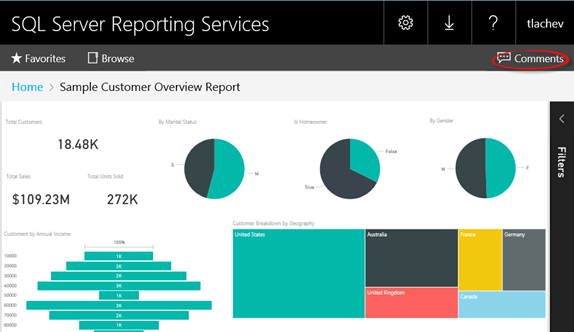
    The first public demo of the highly anticipated Power BI report embedding feature in SSRS 2016 on premises came from Microsoft Ignite. Scroll to the 58 minute in the Ricardo Muti's "Create a modern enterprise reporting and mobile BI solution with SQL Server 2016" video and enjoy! I expect more details at SQL PASS SUMMIT at the end of this month. Thanks to Dan English for pointing out this video.

  • Power BI Adds Time Series Forecasting

    October 1, 2016 / No Comments »

    The September update of Power BI Desktop adds one of the most requested features – time series forecasting on single line charts. You can control the confidence interval and seasonality. To use forecasting, make sure that you add a field of Date data type to the chart axis. Only when a date field is used, then you'll see the Forecast section added to the Analytics pane.

  • Presenting at Atlanta Code Camp 2016

    October 1, 2016 / No Comments »

    I'm presenting Power BI Embedded at Atlanta Code Camp on Saturday, October 15th. You have the app. You have the data. What if your app could put the power of analytics everywhere decisions are made and allow your customers to gain insights? Modern apps with data visualizations built-in have the power to inform decisions in context—for any user and on any device. Join me to discover how you can embed data analytics in any app and on one device powered by Azure and Power BI Embedded. I'll share my experience in helping customers embed Power BI reports. Learn how to: Create compelling interactive reports Embed easily for faster time to value Deploy quickly and manage with ease Find the slides in these locations: 1. This site 2. SlideShare

  • MVP for 13 Years!

    October 1, 2016 / No Comments »

    Microsoft awarded me again with the Most Valuable Professional (MVP) Award for Data Platform. This is a prestigious annual award given to selected individuals in recognition for their expertise and contribution to the community. There are 387 Data Platform MVPs worldwide and 92 of them are in the United States. his makes it 13 consecutive years for me as Data Platform MVP!

  • Power BI Nested Hierarchical Labels

    September 18, 2016 / No Comments »

    In the latest Power BI Desktop update, Power BI introduced a new drill-down option. Previously, after enabling drill-down on a chart and clicking the double-arrow icon, the chart will drill down to the next field in the Axis area (or to the next level of a hierarchy if a hierarchy is added to the Axis area). A student attending my Power BI class asked me this week how to avoid aggregation across all years if the user drills down from Year to the Month level. A few days ago, the only option was to introduce another Month field that has the Year-Month combination, e.g. 2005 July, 2005 August, and so on. Now, with the new drill down style, the chart will nest the hierarchical levels so you don't have to add a new field. This behavior is similar to how Excel show categories nested in PivotChart.

  • Atlanta MS BI Group Meeting on September 26th

    September 18, 2016 / No Comments »

    MS BI fans, join me for the next must-attend Atlanta MS BI and Power BI Group meeting on September 26th at 6:30 PM. The Microsoft Ignite conference takes place this year in Atlanta, starting on Sep 26th. Kamal Hathi (General Manager for Power BI at Microsoft) and Pratap Ladhani (Sr. Program Manager at Microsoft) will be in town for Ignite and we will present at our meeting! This is a must attend session for everyone using or planning to use Power BI. Join us and learn why Power BI enjoys such a tremendous success and where Microsoft is planning to take it. Enjoy catering by Subway, thanks for Microsoft sponsoring this event. Presentation: Power BI at one year - a look back and a look forward  Level: Beginner Date: Monday, September 26th, 2016 Time 6:30 – 8:30 PM ET Place: South Terraces Building (Auditorium Room) 115 Perimeter Center Place Atlanta, GA 30346 Overview:...

  • New Custom Visual Developer Toolset

    September 11, 2016 / No Comments »

    One of the most prominent Power BI benefits is its extensible architecture that allows developers to integrate Power BI with custom apps and extend its capabilities, such by creating custom visuals. Having contributed one of the first custom visuals, the Sparkline custom visual, I can tell from experience that Microsoft does its part to ensure that the submitted visuals meets quality, security, and functionality best practices. As custom visual developers have probably noticed, the Power BI Dev Tools is deprecated in favor of the new Custom Visual CLI Developer Toolset. The announcement page enumerates the main benefits of the new toolset. Personally, I like that Microsoft has decoupled the tool from dependencies to the "visual framework" that the original Power BI visuals use. This allows developers to use whatever dev tool they like, such as Visual Studio Code or Visual Studio, to code custom visuals. I also like the better...

  • AzureML – Current State of Affairs

    September 9, 2016 / No Comments »

    Organizations are showing increased interest in predictive analytics. A large retailer that is using Azure Machine Learning (or AzureML) has approached me to help them automate the process. I can't help it but compare AzureML with the Analysis Service Data Mining each time I look at it. It looks like both Microsoft and I agree at this point, that what used to be difficult was made simple and vice versa. On the upside, AzureML provides business users with a cloud environment for creating predictive solutions without involvement from IT. AzureML has more features than SSAS Data Mining. Now that the focus is on the cloud, we probably won't see future investments from Microsoft in SSAS Data Mining (and the Excel data mining add-in for that matter) which is currently limited to nine algorithms. By contrast, not only has AzureML many more algorithms but also it allows users to use R...

  • Power BI Governance Getting Better

    September 4, 2016 / No Comments »

    Larger organizations are naturally interested in established procedures for data governance, retention, search and taxonomy. With the rising important of data analytics, such policies are equally important for BI artifacts. For example, a large organization wants to restrict users to access Power BI only from approved devices and/ or on premises. Although it doesn't match yet the SharePoint data governance features, Power BI is making strides in this direction. The tenant admin can access the Admin Portal page (log in to powerbi.com, then click Settings, Admin Portal) to: View Power BI usage metrics and utilization. This fulfills a similar role to the Power Pivot Management Dashboard in SharePoint. Manage users. Set global tenant permissions, such as the ability to publish content pack to the entire organization, allowing sharing content with external users, publish to web (anonymous access), export data, interact with R scripts, Cortana, Analyze in Excel, templates, create audit logs,...

Training

We offer onsite and online Business Intelligence classes! Contact us about in-person training for groups of five or more students.
For more information or to register click here!

Books

Learn Power BI at your own pace with our latest book Applied Microsoft Power BI. Targeting information workers, data analysts, pros, and developers, It is designed as an easy-to-follow guide for learning how to implement BI solutions spanning the entire personal-team-organizational BI spectrum.

Syndication