-
Atlanta MS BI Group Meeting on Apr 25th
April 21, 2016 / No Comments »
MS BI fans, join me for the next Atlanta MS BI Group meeting on Apr 25th and 6:30 PM. Paco Gonzalez will present the Azure Internet of Things(IoT) and I'll show you Power BI Embedded Azure cloud service. SolidQ will sponsor the event. Don't forget to RSVP at atlantabi.sqlpass.org so we can't an accurate headcount. Rate this meeting http://aka.ms/PUGSurvey, PUG ID: 104 Presentation: Introduction to Azure Internet of Things (IoT) Level: Intermediate Date: Monday, April 25th, 2016 Time 6:30 – 8:30 PM ET Place: South Terraces Building (Auditorium Room) 115 Perimeter Center Place Atlanta, GA 30346 Overview: The Internet of Things (IoT) is the network of physical objects—devices, vehicles, buildings and other items—embedded with electronics, software, sensors, and network connectivity that enables these objects to collect and exchange data. The Azure Internet of Things (IoT) Suite brings the Internet of your things to life. Connect your devices, analyze previously-untapped data,...
-
Load Testing Tabular
April 17, 2016 / No Comments »
I while back I did a TechEd presentation "Can Your BI Solution Scale?", when I discussed a methodology for load testing SSAS and SSRS. A customer wanted to ensure that its Tabular model can scale to thousands of deployed users when it goes live. You can still use the excellent Microsoft-originated AS Load Sim framework that I demonstrated in the presentation to load test Tabular. And you can use it can send both MDX and DAX queries. One aspect that deserves more attention is how to tweak the framework to parameterize DAX queries. The framework was design to parameterize MDX queries with tupples. For example, if you want to parameterize an MDX query by month, you can specify the set NonEmpty( [Date].[Calendar].[Month].Members, [Measures].[Internet Sales Amount] ). Then, the framework executes the set and assigns tupples from the set in random so you don't just get cached results from the same query....
-
SSRS UX Changes in SQL Server 2016
April 16, 2016 / No Comments »
SQL Server 2016 RC3 (last and feature complete RC) just came out for public review. It includes a couple of interesting UX enhancements. The first one is more of a teaser but shows you that Microsoft is committed to fulfill and go beyond its reporting roadmap. SSRS in native mode plays a central role in this roadmap as the on-premises BI reporting platform. The new portal (the old Report Manager portal is gone BTW) now includes sections if you upload Power BI Desktop files and even Excel workbooks! For SQL Server 2016 RTM timeframe, clicking a file of these two types simply opens it on the client with the corresponding application (Power BI Desktop for PBIX files and Excel for Excel workbooks). So, no embedded web rendering yet but I guess these features won't be there if Microsoft isn't prepared to travel the full distance after RTM. Second, we now...
-
Why Business Like Yours Choose Power BI Over Sisense
April 13, 2016 / No Comments »
As Power BI gains a momentum, expect attacks from vendors to intensify. Do you know that there are thousands of vendors offering BI tools! There is not a month passed by when I'm not asked about some cool vendor. I usually don't criticize other vendors but sometimes I get provoked by their audacity and I need to keep 'em honest. Recently, a customer shared a Sisense whitepaper "Why Business Like Yours Choose Sisense over Power BI" and asked about my thoughts. The whitepaper is not published yet but I guess it will be soon as Sisense has deployed another battle card "Why Business Like Yours Choose Sisense over QlikView" that's already in the open. Overall, Sisense appears to be a just another pure self-service BI player that it's trying to aggressively get noticed and refuses to see further then its nose. Judging by their mantra on YouTube and elsewhere, data warehousing is dead, OLAP...
-
Granting Publishing Rights to Power BI Enterprise Gateway
April 8, 2016 / No Comments »
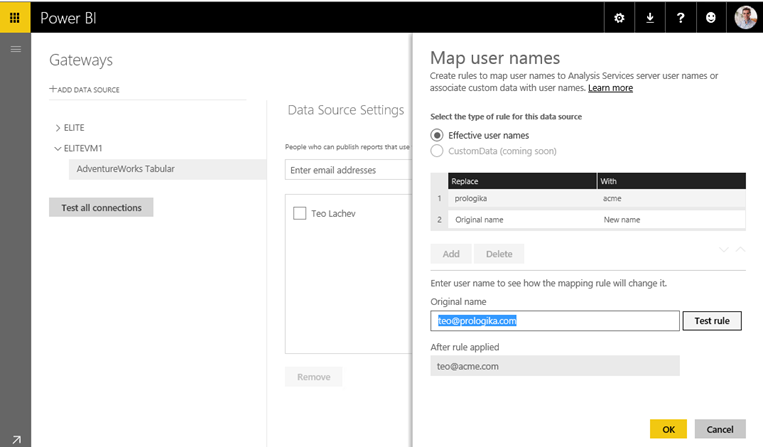
As I explained in a previous blog, the Power BI Enterprise Gateway allows Power BI reports to connect to on-premise data source. A gateway can support multiple data sources. When setting up a data source, you'll see the Users tab on the data source properties. The users you add here will have rights to publish reports that can connect to a data source serviced by the gateway. This is another security check that Microsoft implemented to limit the number of people who can expose data via the gateway. If a user is not in the Users tab, the user can publish a Power BI Desktop file to My Workspace (or to another Power BI workspace if it has rights) but the user won't be able to view reports that connect to a gateway data source. When the user attempts to do so, Power BI will show an error that it...
-
Power BI Embedded
April 7, 2016 / No Comments »
Embedding reports is an extremely popular scenario for ISVs and developers coding external (customer-facing) applications. As I wrote a while back in my "Power BI Embedded Dashboards Without Authentication UI" blog, Power BI supports REST APIs that allow developers to embed dashboards and reports. However, these APIs don't support custom security so you have to provision users with Power BI. Furthermore, a hybrid architecture (reports definitions in the cloud and data on premises) requires Power BI Pro license for each user. This pricing model could quickly become overly expensive if you have to onboard hundreds of users. Power BI Embedded, available for preview on April 1st, aims to remove these obstacles. Designed as an Azure service, it doesn't require changes to the application security. For example, if your application uses Forms Authentication, users can still continue logging in using a user name and password. The application then calls the Azure APIs...
-
Power BI SandDance Visual
March 27, 2016 / No Comments »
One of the announcements from the Data Insights Summit was the SandDance custom visual. Originating from Microsoft Research and coded in SVG, it not only allows you to visually explore data in versatile ways but it also demonstrates how far your custom visuals can go. This is a super visual that combines multiple visualizations, including column chart, grid, scatter chart, density chart, stack chart, and squarify chart (similar to Treemap) visualization. It also demonstrates animations and storytelling with data. You can test the visual outside Power BI with some predefined datasets by going to https://sanddance.azurewebsites.net. Or, you can download it from the Power BI Gallery and try it with your data in Power BI Desktop and Power BI service. When you compare visualization tools, pay attention to how open their capabilities are. Power BI provides several extensibility features. Custom visuals let any web developer extend the Power BI visualization features...
-
Power BI Measure Dimensions
March 24, 2016 / No Comments »
I had an inquiry about how to implement in Power BI/Power Pivot/Tabular something similar to the new Level of Detail (LOD) Expressions feature in Tableau 9.0. A more generic question would be how to turn a measure into a dimension so that you can analyze your data by the distinct values of the measure. Now, in my opinion, most real-life requirements would go beyond just using the distinct values. For example, the first sample Tableau report demonstrates a banding example. But what if you want to group measure values into "buckets", e.g. 1, 2, 3, 4, 5-10, 10-20, etc? Fortunately, DAX has supported powerful expressions since its very beginning. To make the code more compact, the example below uses DAX variables, which were introduced in Power BI Desktop and Excel 2016. However, you don't have to use variables if you use a lower version of Excel. The sample model (attached) has...
-
Atlanta MS BI Group Meeting on Mar 28th
March 24, 2016 / No Comments »
Atlanta MS BI fans, join me for the next Atlanta MS BI Group meeting on Mar 28th and 6:30 PM. Luis Figueroa will show us how to do cloud ETL with Azure Data Factory. Allegient will sponsor the event. Don't forget to register at atlantabi.sqlpass.org. ate this meeting http://aka.ms/PUGSurvey, PUG ID: 104 Presentation: A Closer Look at Azure Data Factory Level: Intermediate Date: Monday, March 28th, 2016 Time 6:30 – 8:30 PM ET Place: South Terraces Building (Auditorium Room) 115 Perimeter Center Place Atlanta, GA 30346 Overview: Azure Data Factory is a modern data orchestration platform design to help you manage any data of any size from any source. It also makes a number of technologies available to you such as Azure Machine learning so that you can integrate predictive machine learning models in your data pipelines. This platform enables you to create intelligent applications that not only provide insights...
-
Power BI Hybrid Architecture
March 23, 2016 / No Comments »
A unique and tremendously useful Power BI feature allows you to implement hybrid solutions where your data remains on premises (SSAS, SQL Server, Oracle, and other data structures) but only report and dashboard definitions are deployed to powerbi.com. This hybrid architecture gives you the best of both worlds: cutting edge cloud-based visualizations with on-premises security, scale, and single version of truth. Since no cloud application can connect directly to your network, a connectivity software, called Power BI Enterprise Management Gateway, acts as a bridge between powerbi.com and your data sources. I'm wrapping up a Power BI Hybrid Architecture proof of concept (POC) for a large organization and I want to recap some important lessons learned: I'm really astonished by the roundtrip speed! It's remarkable that the round trip completes so fast given that powerbi.com (a data center in Virginia for East Cost I believe) connects to a data center in...

We offer onsite and online Business Intelligence classes! Contact us about in-person training for groups of five or more students.