
-
"Bus Matrix – the Foundation of your Dimensional Data Model" Atlanta BI Presentation
January 24, 2014 / No Comments »
Our next Atlanta Microsoft BI meeting will be on Monday, January 27th. The main presentation is "Bus Matrix - the Foundation of your Dimensional Data Model" the speaker is Bill Anton. The meeting will be sponsored by TEK Systems. I hope you can make it. The Bus Matrix is the cornerstone of a successful Dimensional Data Modeling strategy. It serves many purposes: from communicating requirements, capabilities, and expectations with the business users down to the prioritization and delegation of tasks across the development team. Join me in this session and learn what a Bus Matrix is, why it is the single most important document in your Data Warehouse project, and what can go wrong without it. We'll also cover several approaches for creating and maintaining the Bus Matrix. Bill Anton is an independent consultant whose primary focus is designing and developing Data Warehouses and Business Intelligence solutions using the Microsoft...
-
Auto-generating SCHEMA.INI
January 18, 2014 / No Comments »
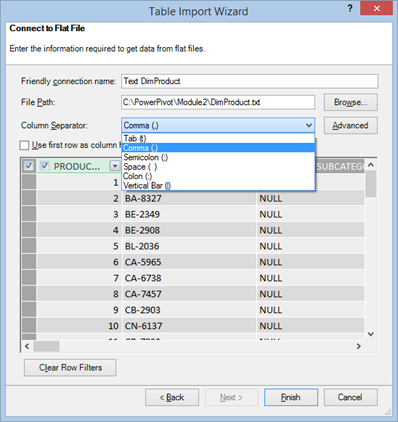
Power Pivot (and Tabular) uses the Access Connectivity Engine (ACE) provider to import from text files. This provider was originally designed for Microsoft Access databases and it's limited to import files no larger than 2 GB (or 4 GB with the Office cumulative update from April 2012) as explained here. The Power Pivot Table Import Wizard allows you to import from delimited files and only a subset of delimiters are available for you to choose from. However, the ACE provider supports a SCHEMA.INI file that can describe other formats, such as fixed-length files, or delimited files that use other delimiters, such as a double-pipe character "||". If a SCHEMA.INI file exists in the same folder where the source file is located, Power Pivot will use the file. Generating the schema file can be tedious, especially if the source file has many columns. However, the ODBC Data Source Administrator tool can...
-
Pick List in SSRS
January 17, 2014 / No Comments »
A customer is moving from Impromptu to SSRS. One of the SSRS missing features that was very important for this customer was the Imprompu pick list that allows users to copy a list of parameter values, such as a list entered in Notepad, to the parameter prompt. For example, the user might get a list of account codes via e-mail and this list may vary from day to day. Instead of hardcoding the list in the query WHERE clause or in the parameter default values, the user wants an easy way to copy and paste the parameter values. Actually, SSRS supports this scenario just fine and without any custom coding on your part. You just need to add a multivalued parameter of type Text and code your SQL query to use an IN clause as usual. The attached report shows how this is done. Just copy the codes below and...
-
Teo’s Best and Worst of Microsoft BI in 2013
January 1, 2014 / No Comments »
In the spirit of the last day of 2013, I'm sipping eggnog and contemplating on BI in 2013. BEST Microsoft leads the Gartner's 2013 Business Intelligence Magic Quadrant. Microsoft leads the Gartner's 2013 Data Warehouse Magic Quadrant. Power View connectivity to Multidimensional (DAXMD) released in CU4 of SQL Server 2012 SP1. SQL Server 2012 Parallel Data Warehouse appliance released with Hadoop support at very attractive pricing. Microsoft is the first vendor to offer natural queries (unfortunately only in the cloud at this point). WORST Microsoft not doing enough to compete effectively on the presentation/visualization front against third party vendors. I'll throw poor mobile support into this bucket too. Slow pace of BI enhancements across product groups. Example: Excel's still lacking Power View support for Multidimensional (DAXMD was released in May). Microsoft pushing cloud BI and deciding to prioritize cloud enhancements, such as natural query, over on premises. Microsoft's ongoing preoccupation with...
-
SharePoint 2010 and Excel 2013 Power Pivot
December 7, 2013 / No Comments »
I've start seeing customers moving to or considering Office 2013 for self-service BI. Naturally, the end users would like to share their Excel 2013 self-service data models by deploying to SharePoint. Does SharePoint 2010 support this scenario? Unfortunately not. The user can upload Excel 2013 files and view the embedded reports. However, when he attempts to perform an interactive action (triggers all backend services involved in processing Power Pivot workbooks) he gets the dreaded error "Unable to refresh data for a data connection in the workbook". What's wrong in this case is that due to the Excel 2013 changes to support Power Pivot natively, Excel Services must load the data model in a different way. This is discussed in more details in the "'Unable to refresh data for a data connection in the workbook' error when you interact with an Excel 2013 workbook in a SharePoint Server 2010 farm" article...
-
Presenting Visualization Options in Microsoft BI
December 7, 2013 / No Comments »
If you have some time amidst the holiday rush, join me on Monday, December 9th, at the Atlanta BI meeting, where I'll present Visualization Options in Microsoft BI. "Confused about visualization choices for your BI solution? How should you design a dashboard to impress your management? Don't know what presentation options exist for organizational and self-service BI? Join us to find answers to these questions and share best practices about the visualization tools in the Microsoft BI platform." Our sponsor will be Computer Associates and you'll learn about the latest Erwin release. Also, don't forget about the user group community party on December 16th.
-
Microsoft Certified Solutions Expert
November 13, 2013 / No Comments »

Just got myself upgraded from MCTIP BI (which retires on January 31st, 2014) to the new MCSE BI certification by passing the three required exams. Over the course of almost 20 years, I've managed to stay current and accumulate a healthy dose of certifications (some of them retired by now), including: 1996: Microsoft Certified Professional 1996: Microsoft Certified Solution Developer 2002: Microsoft Certified Application Developer 2003: Microsoft Certified Trainer 2006: Microsoft Certified Technology Specialist 2011: Microsoft Certified IT Professional 2013: Microsoft Certified Solutions Associate 2013: Microsoft Certified Solutions Expert Some people doubt the benefits of certifications. True, having a certification might not be a true testament of skills or expertise just like someone who only reads or writes books is not a true practitioner. But as with anything in life, I believe that the more you put in, the more you get out. While it's hard to measure the intangible...
-
Finalist for BI and Analytics Innovation Awards
November 13, 2013 / No Comments »

Out of 26 applications, our BI solution for Recall Corporation was nominated as one of the six finalists for the BI and Analytics Innovation Awards presented tonight by the Atlanta TAG B/I society! Although we didn't win the award, we're honored to be shortlisted. Eric Falthzik, Co-chairman at Technology Association of Georgia - Business Intelligence and Analytics Society and Director of Customer Intelligence at Cox Communications said that this is most interesting and sophisticated Microsoft-based solution that he's seen. I'd like to thank Recall for giving us the opportunity to implement an innovative BI solution that changes the way they analyze their business. I'd like to also thank the TAG B/I panelists for appreciating its value.
-
Passing Large Report Parameters
November 8, 2013 / No Comments »
Scenario: A custom application needs to display a filter dialog to prompt the user to select accounts from a tree consisting of thousands of nodes, such as a tree that organizes the accounts in levels. Once the user makes the selection, the application passes the account list to a report parameter so that the report can show the data for the selected accounts only. Issue: The filter list could get rather large. Even if the application follows the Excel filtering pattern to include only the parent node if no child nodes are selected, you might end up with a list consisting of hundreds, perhaps even thousands of accounts. However, Reporting Services has limits on the parameter size. When you test the report in the Report Designer, the report parameter is limited to some 32,000 characters. The Report Viewer doesn't have this limitation so a string-type report parameter can deceptively take...
-
Optimizing Dimension Data Security
October 29, 2013 / No Comments »
Dimension data security is a great feature of Analysis Services and one of the top reasons to strongly consider a semantic layer in your BI implementations, as I mentioned in my "Why Semantic Layer" newsletter. That's because the server automatically secures the cube at connect time so you don't have to implement your own security framework and secure every report query. If you are new to dimension data security, I covered it in various places including this article that I wrote for SQL Magazine a while back. One thing to be aware of is that the server applies dimension data security when the user sends the first query after the connection is established even if this query doesn't specifically request the secured dimension, e.g. SELECT NULL ON 0 FROM [CubeName]. Many things happen at this point (see the steps after "Dimension security is applied to all attributes" in this Mosha blog)....
Training
 We offer onsite and online Business Intelligence classes! Contact us about in-person training for groups of five or more students.
For more information or to register click here!
Books
 Learn Power BI at your own pace with our latest book Applied Microsoft Power BI. Targeting information workers, data analysts, pros, and developers, It is designed as an easy-to-follow guide for learning how to implement BI solutions spanning the entire personal-team-organizational BI spectrum.

