-
Best Visualization Tool for Dashboards?
February 16, 2014 / 3 Comments »
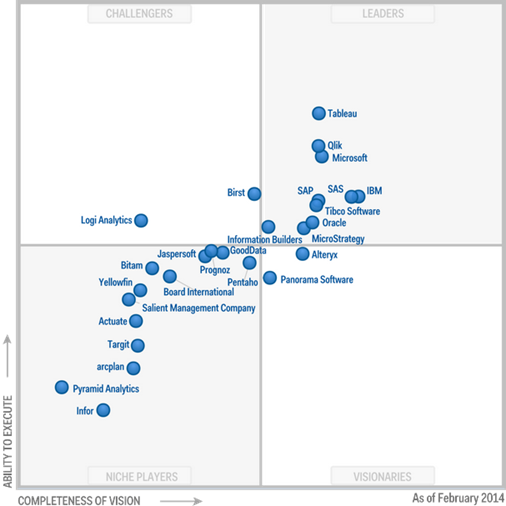
More and more organizations are planning and adopting dashboards. And, the question "which visualization tool is the best for dashboarding?" has been asked more frequently. The visualization aspect of BI has been rapidly evolving. There are plenty of vendors and plethora of tools out there. And, they keep on leap-frogging each other and each one has its strong sides and limitations. More than likely, the darlings of today will be forgotten in a few years. So, a quest to find the perfect tool that does it all is likely to fail or it will be short-lived. I'm not a visualization expert. When it comes to visualizations, I listen to guidance from experts. If you navigate to slide 30 of my "Best Practices for Implementing Enterprise BI Solution", you'll see a mockup of a sales dashboard by Stephen Few that is taken from his excellent "Information Dashboard Design" book. This is...
-
Drill Your Way with Power View
February 11, 2014 / No Comments »
Although it might not be immediately obvious, Power View supports various options for exploring data in more details. Although some scenarios are not natively supported, workarounds could be available. Drilling Down Drilling down involves navigating through multiple fields from the same or different dimensions to explore data at a lower granularity. Every interactive tool supports drilling down (and drilling up) and Power Pivot is no exception. For example, if you have a visualization that has multiple fields in a given zone, such as the AXIS zone, you can double-click a series to drill down to the next level. In the example below, I can double-click the Year series to see the data by Month. Drilling down is not automatically enabled for Table and Matrix visualizations because by default they show all fields in separate columns. What if you want one column but still be able to drill down? If you...
-
Announcing Prologika Match
February 1, 2014 / No Comments »
Data is your biggest asset and today's currency but the data can be messy. You know it and we've seen it. The messier the data, the bigger the headache. At Prologika, we believe that data quality issues should be addressed as early as possible and the validation process should start with the source systems. You need a solution to detect possible duplicated entries without ETL, custom validation code, and exhaustively hard-coded rules. This is why I'm excited to announce today the availability of Prologika Match! Data is "dirty" because of misspellings, truncations, missing or inserted tokens, null fields, unexpected abbreviations, and other irregularities. Prologika Match uses approximate string matching (fuzzy lookup) to detect potential duplicate entries to help you improve data quality at the point of data entry. When the user attempts to save a data entry that is similar to what's already in the database, Prologika Match can detect...
-
Presenting at SQL Saturday Atlanta
February 1, 2014 / No Comments »
The next Atlanta SQL Saturday will be on May 3rd. I'm doing a "Deep Dive into the Microsoft BI Semantic Model (BISM)" pre-conference session on May 2nd. You can register using this link. The organizers set up a promotion code for $10 off registration, good for the first 10 users – the code is "AtlantaBI". Teo Lachev: Deep Dive into the Microsoft BI Semantic Model (BISM) SQL Saturday #285 - Atlanta Friday, May 2, 2014 from 9:00 AM to 4:30 PM (EDT) "The chances are that your organization has a centralized data repository, such as ODS or a data warehouse, but you might not use it to the fullest. Join this insightful full-day event to understand the importance of having a semantic layer that bridges users and data. In the Microsoft BI world, BISM consists of Power Pivot, Tabular, and Multidimensional. We'll start by comparing these technologies to understand their...
-
Divorce Your Methodology
January 29, 2014 / No Comments »
At the Atlanta BI meeting last night, there was a question from the audience about differences between Inmon and Kimball and which methodology should be followed when implementing a data warehouse. I'll recapture my thoughts and the feedback I shared. As BI practitioners, most of us use methodologies and it's easy to fall in love with a specific methodology. But sometimes methodologies conflict each other. So, don't feel very strongly about methodologies. Instead, study them and try to synthetize their best. The best methodology is the one that delivers a business solution in the most practical and simple way. Back to Inmon vs Kimball, I have deep respect for both of them. They both contributed a lot to data warehousing that forms the backbone of modern BI. Both of these two methodologies aim to consolidate data and promote a single version of the truth. Both of them are "pure" database-focused...
-
Is SharePoint Overkill for BI?
January 24, 2014 / No Comments »
As you know, Microsoft BI is tightly interwoven with Excel on the desktop and SharePoint on the server. Most complaints about SharePoint fall in two categories: Complexity – SharePoint is like the ocean. The further you go, the deeper it gets. Troubleshooting is no fun. You know it and I know it. Cost – Most BI features require SharePoint Server Enterprise. Besides the product cost, each user requires a client access (CAL) license (about $100 per user). With larger companies, cost quickly adds up when you roll BI to the masses. You can use the Microsoft License Advisor to estimate your investment but be sure to include additional cost for Windows and SQL servers. So, is SharePoint overkill for BI? My answer is it depends. Let's take a look at the graph that shows the correlation between the organization size and SharePoint features. A small organization might not need SharePoint...
-
"Bus Matrix – the Foundation of your Dimensional Data Model" Atlanta BI Presentation
January 24, 2014 / No Comments »
Our next Atlanta Microsoft BI meeting will be on Monday, January 27th. The main presentation is "Bus Matrix - the Foundation of your Dimensional Data Model" the speaker is Bill Anton. The meeting will be sponsored by TEK Systems. I hope you can make it. The Bus Matrix is the cornerstone of a successful Dimensional Data Modeling strategy. It serves many purposes: from communicating requirements, capabilities, and expectations with the business users down to the prioritization and delegation of tasks across the development team. Join me in this session and learn what a Bus Matrix is, why it is the single most important document in your Data Warehouse project, and what can go wrong without it. We'll also cover several approaches for creating and maintaining the Bus Matrix. Bill Anton is an independent consultant whose primary focus is designing and developing Data Warehouses and Business Intelligence solutions using the Microsoft...
-
Auto-generating SCHEMA.INI
January 18, 2014 / No Comments »
Power Pivot (and Tabular) uses the Access Connectivity Engine (ACE) provider to import from text files. This provider was originally designed for Microsoft Access databases and it's limited to import files no larger than 2 GB (or 4 GB with the Office cumulative update from April 2012) as explained here. The Power Pivot Table Import Wizard allows you to import from delimited files and only a subset of delimiters are available for you to choose from. However, the ACE provider supports a SCHEMA.INI file that can describe other formats, such as fixed-length files, or delimited files that use other delimiters, such as a double-pipe character "||". If a SCHEMA.INI file exists in the same folder where the source file is located, Power Pivot will use the file. Generating the schema file can be tedious, especially if the source file has many columns. However, the ODBC Data Source Administrator tool can...
-
Pick List in SSRS
January 17, 2014 / No Comments »
A customer is moving from Impromptu to SSRS. One of the SSRS missing features that was very important for this customer was the Imprompu pick list that allows users to copy a list of parameter values, such as a list entered in Notepad, to the parameter prompt. For example, the user might get a list of account codes via e-mail and this list may vary from day to day. Instead of hardcoding the list in the query WHERE clause or in the parameter default values, the user wants an easy way to copy and paste the parameter values. Actually, SSRS supports this scenario just fine and without any custom coding on your part. You just need to add a multivalued parameter of type Text and code your SQL query to use an IN clause as usual. The attached report shows how this is done. Just copy the codes below and...
-
Teo’s Best and Worst of Microsoft BI in 2013
January 1, 2014 / No Comments »
In the spirit of the last day of 2013, I'm sipping eggnog and contemplating on BI in 2013. BEST Microsoft leads the Gartner's 2013 Business Intelligence Magic Quadrant. Microsoft leads the Gartner's 2013 Data Warehouse Magic Quadrant. Power View connectivity to Multidimensional (DAXMD) released in CU4 of SQL Server 2012 SP1. SQL Server 2012 Parallel Data Warehouse appliance released with Hadoop support at very attractive pricing. Microsoft is the first vendor to offer natural queries (unfortunately only in the cloud at this point). WORST Microsoft not doing enough to compete effectively on the presentation/visualization front against third party vendors. I'll throw poor mobile support into this bucket too. Slow pace of BI enhancements across product groups. Example: Excel's still lacking Power View support for Multidimensional (DAXMD was released in May). Microsoft pushing cloud BI and deciding to prioritize cloud enhancements, such as natural query, over on premises. Microsoft's ongoing preoccupation with...

We offer onsite and online Business Intelligence classes! Contact us about in-person training for groups of five or more students.